Add games to Eglantine
Point it at a folder you already have
The handbook says to double-click the main window and choose the folder that holds your games. The readme, the handbook, and the PS5 port’s readme all limit that folder to games dumped from your own console. This page does not link dumps, keys, or firmware.
Two layouts show up in release notes. A loose dump has exefs/main under the game, and updates under updates/<title id>/exefs/main. A .nup file, short for Nintendo Unencrypted Package in the build-135 notes, packs base, update and DLC into one file. Those notes say the packed file is smaller and the list loads faster.
Convert, unpack, and version labels
Build 135 adds a right-click command, Convert to NUP. The dialog asks for title, publisher, version, icon and names in more than one language, then Convert. Build 188 adds Dump NUP, which unpacks back to base/, updates/<version>/ and dlc/<title id>/<n>/. The two screenshots in that release’s notes are the dialog and the progress window. I use those project images on this page rather than drawing a fake window.
Build 54 changed version labels for loose dumps. The version can come from control.nacp or from ResourceSizeTable.Product.NNN in the RomFS, so the list does not have to stay stuck on 1.0.0. If a row still says 1.0.0, that is a clue to check which build you are on, not proof the dump is the launch version.
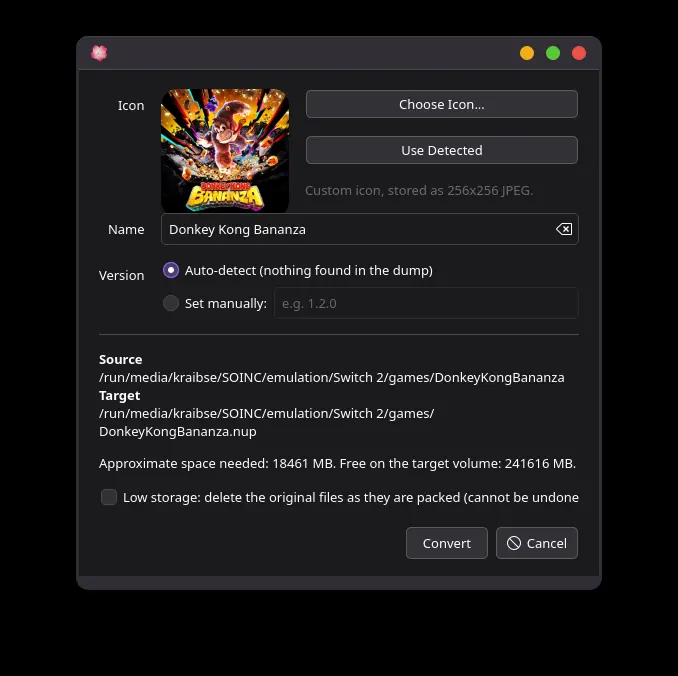
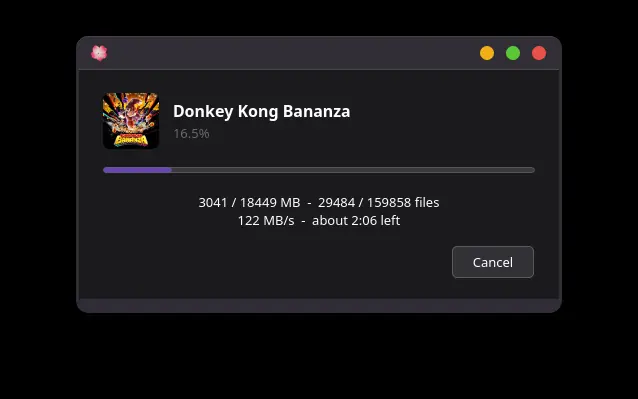
Video
Channel video: How To Play Pokopia On PC | Nintendo Switch 2 Emulator Guide. Nothing from YouTube loads until you press play.
Questions
Can I add a game by dropping a file from a random site?
The project text I read only describes dumps from your own console. I do not add other sources.
Loose folder or .nup?
Both are described. Build 135 is where the packer landed. Build 188 is where unpacking landed. Either layout still needs keys and firmware installed first.
Sources
Links from the same publisher count as one source; a community compilation counts as one source even when it contains many reports.
| Source | Status | Checked |
|---|---|---|
| User handbook | Public page · 1 source | 2026-11-07 |
| Eglantine releases | Public page · 1 source | 2026-11-07 |
| Eglantine readme | Public page · 1 source | 2026-11-07 |